Active Endpoints’ Cloud Extend For Salesforce Goes Live

Next week at at Dreamforce, Active Endpoints’s new Cloud Extend for Salesforce will officially go live. I had a briefing a few months back when it hit beta, and an update last week where I saw little new functionality from the first briefing, but some nice case studies and partner support.
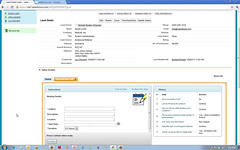
Introduction Call guide - set up meeting.jpgCloud Extend for Salesforce is a helper layer that integrates with Salesforce that allows business users to create lightweight processes and guides – think screenflows with context-sensitive scripting – to help users through complex processes in Salesforce. In Salesforce, as in many other ERP and CRM systems, achieving a specific goal sometimes requires a complex set of manual steps. Adding a bit of automation and a bit of structure, along with some documentation displayed to the user at the right time, can mean the difference between a process being done correctly or having some critical steps missed. If you look at the Cloud Extend case study with PSA Insurance & Financial Services covered in today’s press release, a typical “first call” sales guide created with Cloud Extend includes such actions as recording the prospect’s current policy expiration date, setting reminders for call-back, sending out collateral and emails to the prospect, and interacting with other PSA team members via Salesforce Chatter. This will mean that less follow-up items are missed, and improve the overall productivity of the sales reps since some of the actions are automated or semi-automated. Michael Rowley, CTO of Active Endpoints, wrote about about Cloud Extend at the time of the beta release, covering more of the value proposition that they are seeing by adding process to data-centric applications such as Salesforce. Lori MacVittie of F5 wrote about how although data and core processes can be commoditized and standardized, customer interaction processes need to be customized to be of greatest value. Interestingly, the end result is still a highly structured pre-defined process, although one that can be created by a business user using a simple tree structure.

When I saw a demo of Cloud Extend, I was reminded of similar guides and scripts that I’ve seen overlaid on other enterprise software to assist in user interactions, usually for telemarketing or customer service to be prompted on what to say on the phone to a customer, but this is more interactive than just scripts: it can actually update Salesforce data as part of the screenflow, hence making it more of a BPM tool than just a user scripting tool. Considering that the ActiveVOS BPMS is running behind the scenes, that shouldn’t come as a surprise, since it is optimized around integration activities. Yet, this is not an Active Endpoints application: the anchor application is Salesforce, and Cloud Extend is a helper app around that rather than taking over the user experience. In other words, instead of a BPMS silo in the clouds as we’re seeing from many BPMS cloud vendors, this is using a BPMS platform to facilitate a functionality integrated into another platform. A cloud “OEM” arrangement, if you please.
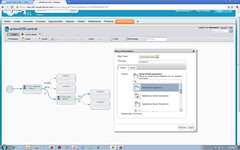
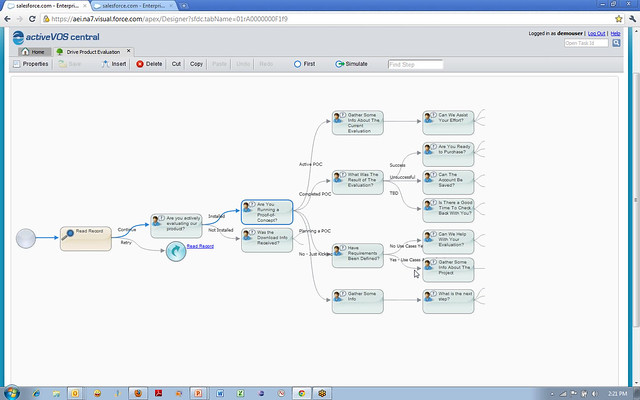
Creating a new guide - set automated email step actionThe Guide Designer – a portal into the ActiveVOS functionality from within Salesforce – allows a non-technical user to create a screen flow, add more screens and automated steps, call subflows, and call Salesforce functions. The flow can be simulated graphically, stepping forwards and backwards through it, in order to test different conditions; note that this is simulation in order to determine flow correctness, not for the purpose of optimizing the flow under load, hence is quite different from simulation that you might see in a full-featured BPA or BPMS tool. Furthermore, this is really intended to be a single-person screen flow, not a workflow that moves work between users: sort of like a macro, only more so. Although it is possible to interrupt a screen flow and have another person restart it, that doesn’t appear to be the primary use case.

There are a few bits that likely a non-technical user couldn’t do without a bit of initial help, such as creating automated steps and connecting up the completed guides to the Salesforce portal, but it is pretty easy to use. It uses a simple branching tree structure to represent the flow, where the presence of multiple possible responses at a step creates the corresponding number of outbound branches. In flowcharting terms, that means only OR gates, no merges and no loopbacks (although there is a Jump To Step capability that would allow looping back): it’s really more of a decision tree than what you might thing of as a standard process flow.

Creating a guide, or a “guidance tree” as it is called in the Guide Designer consists of adding an initial step, specifying whether it is a screen (i.e., a script for the user to read), an automated step that will call a Salesforce or other function, a subflow step that will call a predefined subflow, a jump to step that will transfer execution to another point in the tree, or an end step. Screen steps include a prompt and up to four answers to the prompt; this is the question that the user will answer at this point in response to what is happening on their customer call. One outbound path is added to the step for each possible answer, and a subsequent step automatically created on that path. The branches keep growing until end steps are defined on each branch.
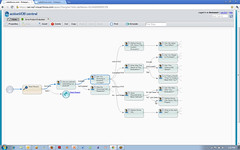
Complex guidance tree - additional steps on right revealed on navigationA complex tree can obviously get quite large, but the designer UI has a nice way of scrolling up and down the tree: as you select a particular step, you see only the connected steps twice removed in either direction, with a visual indicator to show that the branch continues to extend in that direction.

Regardless of the complexity of the guidance tree, there is no palette of shapes or anything vaguely BPMN-ish: the user just creates one step after another in the tree structure, and the prompt and answers create the flow through the tree. Active Endpoints see this tree-like method of process design, rather than something more flowchart-like, to be a key differentiator. In reality, under the covers, it is creating BPMN that is published to BPEL, but the designer user interface just limits the design to a simple branching tree structure that is a subset of both BPMN and BPEL.

Once a flow is created and tested, it is published, which makes it available to run directly in the Salesforce sales guides section directly on a sales lead’s detail page. As the guide executes, it displays a history of the steps and responses, making it easy for the user to see what’s happened so far while being guided along through the steps.
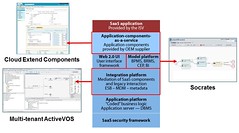
Cloud Extend, Socrates modeler and multi-tenant ActiveVOS in the PaaS stackObviously, the Active Endpoints screen flows are executing in the cloud, although as of the April release, they were using Terremark rather than hosting it on Salesforce’s platform. Keeping it on an independent platform is critical for them, since there are other enterprise cloud software platforms with which they could integrate for the same type of benefits, such as Quickbooks and SuccessFactors. Since there is very little data persisted in the process instances within Cloud Extend, just some execution metrics for reporting and the Salesforce object ID for linking back to records in Salesforce, there is less concern about where this data is hosted, since it will never contain any personally identifiable information about a customer.

We’re starting to see client-side screen flow creation from a few of the BPMS vendors – I covered TIBCO’s Page Flow Models in my review of AMX/BPM last year – but those screen flows are only available at a step in a larger BPMS model, whereas Cloud Extend has encapsulated that capability for use in other platforms. For small, nimble vendors who don’t need to own the whole application, providing embeddable process functionality for data-centric applications can make a lot of sense, especially in a cloud environment where they don’t need to worry about the usual software OEM problems of installation and maintenance.

I’m curious about whatever happened to Salesforce’s Visual Process Manager and whether it will end up competing with Cloud Extend; I had a briefing of Visual Process Manager over a year ago that amounted to little, and I haven’t heard anything about it since. Neil Ward-Dutton mentions these two possibly-competing offerings in his post on the beta release of Cloud Extend, but as he points out, Visual Process Manager is more of a general purpose workflow tool, while Cloud Extend is focused on task-specific screen flows within the Salesforce environment. Just about the opposite of what you might have expected to come out of these respective vendors.

Cloud Extend

2011 BPM Conference Season, Part 2

The fall conference season is about to kick off. Although I’ve turned down a few invitations because of the heavy client travel schedule (where I’m actually implementing the stuff I talk about, but don’t talk about directly, hence the lack of blogging lately), you can catch me at a few places this fall:

bpmlogoBPM 2011, the 9th annual academic research conference on BPM in Clermont-Ferrand. where I will be keynoting the industry track. I have attended this conference for the past few years and am hugely honored to be asked to keynote. I love this conference because it gives me a peek into the academic research going on in BPM – although I barely remember what an eigenvector is, I can always see some good ideas emerging here that will undoubtedly become some software vendor’s killer feature in a few years. This conference was in the US last year for the first time (it is usually in Europe, where a great deal of the research goes on) and I encouraged a lot of US BPM vendors to attend; hopefully, they will have seen the value in the conference and will get themselves on an international flight this time.
progresstriumph_logoProgress Software’s Revolution user conference in Boston, where I will be delivering an Introduction to BPM workshop. As Progress continues to integrate the Savvion acquisition, they are dedicated to educating their user community and channel partners on BPM, and this workshop forms part of those efforts.

bbc_125_isfBuilding Business Capability (formerly Business Rules Forum and Business Process Forum) in Fort Lauderdale, where I am reprising an updated version of my Aligning BPM and Enterprise Architecture tutorial that I gave at the IRM BPM conference in London in June. I’m also sitting on and/or moderating three panels: one on the Process Knowledge Initiative, one on Business  Architecture versus Technical Architecture, and a BPM vendor panel.

I may be attending a few other conferences, but with my Air Canada gold status already in the bag for next year, there’s no pressure. 🙂

Business Process Manifesto By @RogerBurlton – Open For Comments

Roger Burlton, who has been doing business process stuff for even longer than me, has written The Business Process Manifesto, which he describes as “A necessary foundation for all things process”. He’s gathered some feedback on this at a few conferences, and has asked me to post it here for more comments:

Please review and add any comments here; I appreciate if you would use your real name and email address in the comment form (only I can see the email addresses) so that I can pass these on to Roger in case he wants to follow up with you on your comments.

Salesforce’s Peter Coffee On The Cloud

I just found my notes from a Salesforce.com lunch event that I went to in Toronto back in April, where Peter Coffee spoke enthusiastically while we ate three lovingly-prepared courses at Bymark, and was going to just pitch them out but found that there was actually quite a bit of good material in there. Not sure how I managed to write so much while still eating everything in front of me.

This came just a few days after the SF.com acquisition of Radian6, a move that increased the Canadian staff to 600. SF has about 1,500 customers in Canada, a few of whom where in the room that day. Their big push with these and all their customers is on strategic IT in the cloud, rather than just cost savings. One of the ways that they’re doing this is by incorporating process throughout the platform, allowing it to become a global user portal rather than just a collection of silos of information.

Coffee discussed a range of cloud platform types:

  • Infrastructure as a service (IAAS) provides virtualization, but persists the old IT and application development models, combining the weaknesses of all of them. Although you’ve outsourced your hardware, you’re still stuck maintaining and upgrading operating systems and applications.
  • Basic cloud application development, such as Google apps and their add-ons.
  • SF.com, which provides a full application development environment including UI and application support.

The old model of customization, that most of us are familiar with in the IT world, has led to about 1/3 of all enterprise software running on the current version, and the rest stuck with a previous version, unable to do the upgrade because the customization has locked it in to a specific version. This is the primary reason that I am so anti-customization: you get stuck on that old version, and the cost of upgrading is not just the cost of upgrading the base software, but of regression testing (and, in the worst case, redeveloping) all the customization that was done on top of the old version. Any wonder that software maintenance ends up costing 10x the original purchase cost?

The SF.com model, however, is an untouchable core code base sitting on managed infrastructure (in fact, 23 physical instances with about 2,000 Dell servers), and the customization layer is just an abstraction of the database, business logic and UI so that it is actually metadata but appears to be a physical database and code. In other words, when you develop custom apps on the SF.com platform, you’re really just creating metadata that is fairly loosely coupled with the underlying platform, and resistant to changes therein. When security or any other function on the core SF.com platform is upgraded, it happens for all customers; virtualization or infrastructure-as-a-service doesn’t have that, but requires independent upgrades for each instance.

Creating an SF.com app doesn’t restrict you to just your app or that platform, however: although SF.com is partitioned by customer, it allows linkages between partners through remapping of business objects, leveraging data and app sharing. Furthermore, you can integrate with other cloud platforms such as Google, Amazon or Facebook, and with on-premise systems using Cast Iron, Boomi and Informatica. A shared infrastructure, however, doesn’t compromise security: the ownership metadata is stored directly with the application data to ensure that direct database access by an administrator doesn’t allow complete access to the data: it’s these layers of abstraction that help make the shared infrastructure secure. Coffee did punt on a question from the (mostly Canadian financial services) audience about having Canadian financial data in the US: he suggested that it could be encrypted, possibly using an add-on such as CipherCloud. They currently have four US data centers and one in Singapore, with plans for Japan and the EU; as long as customers can select the data center country location that they wish (such as on Amazon), that will solve a lot of the problem, since the EU privacy laws are much closer to those in Canada. However, recent seizures of US-owned offshore servers brings that strategy into question, and he made some comments about fail-overs between sites that makes me think that they are not necessarily segregating data by the country specified by the customer, but rather picking the one that optimizes performance. There are other options, such as putting the data on a location-specific Amazon instance, and using SF.com for just the process parts, although that’s obviously going to be a bit more work.

Although he was focused on using SF.com for enterprises, there are stories of their platform being used for consumer-facing applications, such as Groupon using the Force.com application development platform to power the entire deals cycle on their website. There’s a lot to be said for using an application development environment like this: in addition to availability and auto-upgrading, there’s also built-in support for multiples mobile devices without changing the application, using iTunes for provisioning, and adding Chatter for collaboration to any application. Add the new Radian6 capabilities to monitor social media and drive processes based on social media interactions and mentions, and you have a pretty large baseline functionality out of the box, before you even start writing code. There are native ERP system and desktop application connectors, and a large partner network offering add-ins and entire application suites.

I haven’t spent any time doing evaluation specifically of Salesforce or the Force.com application development platform (except for a briefing that I had over a year ago on their Visual Process Manager), but I’m a big fan of building applications in the cloud for many of the reasons that Coffee discussed. Yes, we still need to work out the data privacy issues; mostly due to the potential for US government intervention, not hackers. More importantly, we need to get over the notion that everything that we do within enterprises has to reside on our own servers, and be built from the metal up with fully customized code, because that way madness lies.

Strategic Synergies Between BPM, EA and SOA

I just had to attend Claus Jensen’s presentation on actionable architecture with synergies between BPM, EA and SOA since I read two of his white papers in preparing the workshop that I delivered here on Wednesday on BPM in an EA context. I also found out that he’s co-authored a new red book on EA and BPM.

Lots of great ideas here – I recommend that you read at least the first of the two white papers that I link to above, which is the short intro – about how planning (architecture) and solution delivery (BPM) are fundamentally different, and you can’t necessarily transform statements and goals from architecture into functions in BPM, but there is information that is passed in both directions between the two different lifecycles.

He went through descriptions of scenarios for aligning and interconnecting EA and BPM, also covered in the white papers, which are quite “build a (IBM-based) solution”-focused, but still some good nuggets of information.

Workshop: BPM In An EA Context

Here’s my presentation slides from the workshop that I gave on Wednesday here at the IRM BPM conference in London, entitled Architecting A Business Process Environment:

As always, some slides may not make much sense without my commentary (otherwise, why would I be there live?), but feel free to ask any questions here in the comments.

BPM Rapid Development Methodology

Today at the IRM BPM conference, I started with a session by Chris Ryan of Jardine Lloyd Thompson on a rapid development methodology with BPMS in their employee benefits products area.

They’ve been a HandySoft customer since 2004, using BizFlow both for internal applications, and for external-facing solutions that their customers use directly; they switched off a Pega project that was going on (and struggling) in one of their acquisitions and replaced it with BizFlow in about 4 months. However, they were starting to become a victim of their own success, with many parts of the organization wanting their process applications developed by the same small development team.

They weren’t doing their BPM solutions in a consistent and efficient fashion, and were using a waterfall methodology; they decided to move to an Agile development methodology, where the requirements, process definition and application/form design are all done pretty much simultaneously with full testing happening near the end but still overlapping with ongoing development. They’ve also starting thinking about their processes in a more service-oriented way that allows them to design (sub)processes for specific discrete functions, so that different people can be working on the subprocesses that will make up part of a higher-level process. This has tracking implications as well: users viewing a process in flight can look at the top level process, or drill down into the individual functions/subprocesses as required.

They’ve established best practices and templates for their user interface design, greatly reducing the time required and improving consistency. They’ve built in a number of usability measures, such as reducing navigation and presenting only the information required at a specific step. I think that this type of standardization is something rarely done in the user interface end of BPMS development, and I can see how it would accelerate their development efforts. It’s also interesting that they moved away from cowboy-style development into a more disciplined approach, even while implementing Agile: the two are definitely not mutually exclusive.

This new methodology and best practices – resulting in a lean BPM team of analysts, PMs, developers, testers and report writers – have  allowed them to complete five large projects incorporating 127 different processes in the past year. Their business analysts actually design the processes, involving the developers only for the technical bindings; this means that the BAs do about 50% of the “development”, which is what all of the BPMS vendors will tell you should be happening, but rarely actually happens in practice.

From an ROI standpoint, they’ve provided the infrastructure that has allowed the company to grow its net profit by 46%, in part through headcount reduction of as much as 50% in some areas, and also in the elimination of redundant systems (e.g., Pega).

They’ve built a business process competency center, and he listed the specific competencies that they’ve been developing in their project managers, analysts, developers and “talent development” (training, best practices and standards). Interestingly, he pointed out that their developers don’t need to have really serious technical skills because the BizFlow developer really doesn’t get that technical.

He finished up with their key success factors: business involvement and user engagement, constant clear communications amongst stakeholders, and good vendor support. They found that remote teams can work well, as long as the communication methods support the user engagement throughout the process, since Agile requires constant review by users and retuning of the application under development throughout the lifecycle, not just during a final testing stage.

Great success story, both for JLT and for HandySoft.

Building a Business Architecture Capability and Practice Within Shell

For the first breakout of the day, I attended Dan Jeavon’s session on Shell’s business architecture practice. For such a massive company – 93,000 employees in 90 countries – this was a big undertaking, and they’ve been at this for five years.

He defines business architecture as the business strategy, governance, organization and key business process information, as well as the interaction between these concepts, which is taken directly from the TOGAF 9 definition. Basically, this involves design, must be implemented and not just conceptual, and requires flexibility based on business agility requirements. They started on their business architecture journey because of factors that affect many other companies: globalization, competition, regulatory requirements, realization of current inefficiencies, and emergence of a single governance board for the multi-national company.

Their early efforts were centered on a huge new ERP system, especially with the problems due to local variations from the global standard process models. “Process” (and ERP) became naughty words to many people, with connotations of bloated, not-quite-successful projects. Following on from some of the success points, their central business architecture initiative actually started with process modeling/design: standard processes across the different business areas with global best practices. This was used to create and roll out a standard set of financial processes, with a small core team doing the process redesign, and coordinating with IT to create a common metamodel and architectural standards. As they found out, many other parts of the company had similar process issues – HR, IT and others – so they branched out to start building a business architecture for other areas as well.

They had a number of challenges in creating a process design center of excellence:

  • Degree of experience with the tool and the methodology; initial projects weren’t sufficiently structured, reducing benefits.
  • Perceived value to the business, especially near-term versus long-term ROI.
  • Impact of new projects, and ensuring that they follow the methodology.
  • Governance and high-level sponsorship.

They also found a number of key steps to implementing their CoE and process architecture:

  • Sponsorship
  • Standard methodology, embedded within standard project delivery framework
  • Communication of success stories

Then, they migrated their process architecture initiative to a full business architecture by looking at the relationships to other elements of business architecture; this led to them do business architecture (mostly) as part of process design initiatives. Recent data quality/management initiatives have also brought a renewed focus on architecture, and Jeavons feels that although the past five years have been about process, the next several years will be more about data.

He showed a simplified version of their standard metamodel, including aspects of process hierarchy models, process flow models, strategy models and organization models. He also showed a high-level view of their enterprise process model in a value stream format, with core processes surrounded by governing and supporting processes. From there, he showed how they link the enterprise process model to their enterprise data catalogue, which links to the “city plan” of their IT architecture and portfolio investment cycle; this allows for traceability as well as transparency. They’ve also been linking processes to strategy – this is one of the key points of synergy between EA and BPM – so that business goals can be driven down into process performance measures.

The EA and process design CoE have been combined (interesting idea) into a single EA CoE, including process architects and business architects, among other architect positions; I’m not sure that you could include an entire BPM CoE within an EA CoE due to BPM’s operational implementation focus, but there are certainly a lot of overlapping activities and functions, and should have overlapping roles and resources.

He shared lots of great lessons learned, as well as some frank assessment of the problems that they ran into. I particularly found it interesting how they morphed a process design effort into an entire business architecture, based on their experience that the business really is driven by its processes.

Designing a Breakout Business Strategy

The keynote this morning was A Strategic Toolkit for Designing and Delivering A Breakout Strategy by Professor Thomas Lawton of EMYLON Business School. This was about business strategy, starting with a view of how different companies responded to the recent/ongoing recession: panic, protect, cloak or conquer, where the first three are reactive but with different results (negative, neutral, positive) and the last of which is proactive. He had examples of each; for example, how Sony used a “cloak” response to take business cutback measures that would have been difficult during good times, improving the business overall. He challenged the audience to consider which of the four responses that our organizations have adopted, and some strategies for dealing with the current economic conditions. Although it’s not easy to think about success when you’re fighting for survival, you need to be proactively preparing for the inevitable upturn so as to be able to seize the market when it starts improving. I definitely started thinking about BPM at this point; organizations that implement BPM during a down market in order to control costs often find themselves well-positioned to improve their market share during the upswing because they are more efficient and more agile to respond to customer needs.

He introduced a few different tools that form a strategy system:

  • Identify your route to breakout and market success. He showed a quadrant comparing breakout styles, “taking by storm” and “laggard to leader” (often an ailing company that is turned around), against emergent and established markets; all of these indicate significant opportunities for growth. Again, he had great examples for each of these, and discussed issues of adapting these strategies to different corporate cultures and geographic/regulatory environments. He presented a second quadrant for those organizations who are staying out in front of their market, with the breakout styles “expanding horizons” and “shifting shape”, also against emergent and established markets. For each of the squares in each of these quadrants, he has an evocative moniker, such as “boundary breakers” or “conquistadors”, to describe the companies that fit that growth strategy profile.
  • Identify your corporate vision, providing a sense of purpose, and considering the viewpoints of all stakeholders. The vision wheel is his technique for finding the corporate vision by breaking down the organization, culture, markets and relationships into their constituent parts, considering both current and future state, ending up with four worksheets across which you will see some common threads to guide the future strategy. Vision can be a bit of a fuzzy concept, but is a guiding star that is critical for direction setting and strategic coordination.
  • Align your value proposition with the needs of your customers. Aspire to create a “magnet company”, one that excites markets, attracts and retains customers, repels new entrants, and renders competitors unable to respond. This doesn’t mean you have to be the best in all aspects of what you do, but you have to be top in the features of what your customers care about, from the general areas of price, features, quality, support, availability and reputation.
  • Assemble an IT-enabled business model that is both efficient and effective; think about your business model as a vehicle for delivering your value proposition, and focus on alignment between those two. He discussed the six pillars of a business model: cost, innovation, reliability, relationships, channels and brand (which are just the other side of the six features discussed in the value proposition); some of these will emerge as your core competencies and become the source of competitive advantage.
  • Every business is both a techno and socio system: you need to consider both hard and soft aspects. He pointed out that it’s necessary to embed IT in strategy implementation, since almost all businesses these days are highly dependent on technology; technology can be used to realize an energized and productive socio-system (e.g., inspiring trust and loyalty) as well as an efficient and productive techno-system.

The breakout strategy system that he lays out has strategic leadership at the center, with products and programs, vision, value proposition, and business model surrounding it.

He finished up with the interaction between business and IT strategy:

  • Breakout strategies are enabled by IT
  • IT contributes to improve financial performance
  • IT supports strategy implementation

Unfortunately, only 19% of companies involve IT in the early strategy phase of growth initiatives; in other words, executives are not really considering how IT can help them with strategy. The impact of IT on business strategies, corporate structure and culture should be better understood. In particular, EA should be involved in strategy at this level, and BPM can be an important enabler of breakout strategies if that is understood early enough in the strategy development cycle.

Really great presentation, and I’ll definitely be tracking down some of his books for more reading on the topic.

By the way, some great tweets are starting to flow at the conference; you can find them at the hashtags #IRMBPM and #IRMEAC.

IRM BPM and EA Conferences Kickoff

Sally Bean and Roger Burlton opened the dual IRM’s colocated BPM and EA conferences in London this morning with a tag-team presentation on the synergies between EA and BPM – fitting nicely with 3-hour workshop that I gave yesterday on BPM in an EA context.

EA provides a framework to structure for transiting from strategy to implementation. BPM – from architecture through implementation – is a process-centric slice that intersects EA at points, but also includes process-specific operational activities. They present EA and BPM as collaborative, synergistic disciplines:

  • Common, explicit view of business drivers and business strategy
  • Shared understanding of business design
  • Disciplined approach to change prioritization and road maps
  • Coherent view of the enterprise through shared models
  • Monitoring fit between current performance and business environment

They briefly introduced John Zachman to the stage, but wouldn’t actually let him speak more than a minute, because we’d never get to the keynote Winking smile. I had the pleasure of having a conversation with John yesterday evening while having a drink with Roger and a few others (which was a bit weird because I had just been talking about his framework in my workshop, and this blog is named after the process column therein); during that time, I helped him get his iPhone onto the hotel wifi, which probably says something about the differences between EA and BPM…