I’ve reviewed a lot of BPM systems, and one of the most common weak points is in developing the part of the process application that isn’t generated from the process model: user interfaces, data models, security, business logic and integration with legacy systems. Some of this is improving, with the addition of graphical forms builders for UI, and integration of business rules engines, but these are typically the places where you have to drop out of that lovely BPMS environment and write some Java UI code, or hand-craft a data model. Although the process models might be easy to change, as soon as you start writing code, your BPMS turns from agile to brittle.
BPMS vendors tend to focus on process modeling and generating an executable process from that model first, then later tack on features to expand into a full application development suite. OutSystems has taken the opposite approach: they’re an Agile application development suite vendor that’s adding business process management as a feature in their application development toolkit.
Backing up a bit, OutSystems makes a model-driven application development suite called Agile Platform, that allows for rapid development of web-based applications that involve complex system integration and rich user interfaces. Headquartered in Portugal, they developed a strong European customer base before entering the North American market in 2007, and helped boost adoption by offering a free community edition. Agile Platform manages the whole application lifecycle: following the model-driven development, you deploy and manage your applications directly from it, and there are tools for collecting user feedback directly within the executing applications to feedback to the developers for potential changes.
With Agile Platform 5.0, released earlier this week, they’ve added business processes to the application development mix. Since their product is targeted at developers, their process modeler isn’t for a non-technical business analyst: it’s a capability within the model-driven application development environment, just like data modeling and UI development. Other application artifacts, such as screens, can be integrated with the process to show the the interrelationship between the process and application.
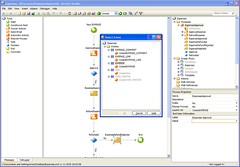 The process modeler isn’t BPMN, but a simple flowchart format without swimlanes, and with a small but adequate set of flow elements: start, conditional start, human activity, automated activity, execute process, send email, wait, decision, end and comment. The start event may be triggered by user input on a form or by some simple events include database triggers, but there are no intermediate or end events. Since you’re working in an integrated application development environment, there are data modeling tools allowing you to create the process instance data model and view it as an entity-relationship diagram: this is just part of the overall application data model, and treated as such. Similarly, you can create a user interface, drag fields onto it from the data model, add the screen flow logic, and bind it to a step in the process. If you want a quick demo, there’s a screencam on their site showing how to build a business process in 30 minutes (although it only runs 9 minutes since there’s some fast-forwarding through the boring bits).
The process and application are deployed as a single unit for execution, since the process is just an extension of the application. Agile Platform generates and compiles standard .NET or Java code from the models, updates databases with the data models and deploys the code on the application servers in a single step. If you want to stop using Agile Platform at some point, you can take the generated source code (which looks pretty clean) and work directly with it. Since this executes as compiled code, it’s fairly efficient: they reported one of their beta customers as having 16 high-level processes with more than 200 activities each, and 3.8 million activities in flight at any given time.
An interesting user interface feature is that if you’re anywhere in the application/portal and you have uncompleted tasks, you’ll see a little floating box showing a counter of your incomplete tasks; click on it to list the tasks, then click on one to open and process it. After completion, you’re automatically returned to where you were in the portal before processing the task. That means that occasional process participants don’t need to keep checking their process inbox to see if they have tasks assigned to them.
They’ve also included a predefined analytical model for process reporting and have some monitoring capabilities in the enterprise edition, although I didn’t see that during the briefing.
To be clear, Agile Platform does not offer full BPMS functionality: there’s no true orchestration, no event handling (aside from a few start events), and no process reusability. Their intention is to provide “good enough” process management for primarily human-facing processes, in the context of a web-based business application. The application is primary; process is just another feature of the application. Although process-centric BPM types might recoil in horror from that idea since it violates the idea of end-to-end processes independent of applications, this is how many businesses view things: users think about performing a function in the CRM application without much awareness that they are participating in the order-to-cash process, and developers want a single application lifecycle to manage for both applications and related processes.
The opposite of BPMS vendors who have been building (often substandard) application development environments to extend their process modeling and execution, Agile Platform adds process modeling and execution to a robust application development environment. They have a proven track record in doing application development right; it remains to be seen if they’re doing BPM right as well.
